Friday, August 31, 2012
Sweet Sunday Love

Hey guys!
Today I am using PTU kit called "SweetSundayLove"
and you can get it here.
Tube by Misticheskaya at PFD.
Dropshadow-ds
element-el
paper-pp
copy&paste-add
(I drag my things into my canvas)
600x600 blank canvas.
open frame 5 and background to tube .
take your magic wand and click inside of frame.
selections-modify-expand by 5-invert-background pp-delete key.
while this is still selected add in fence-delete key.add ds
add ds to frame
add in close up of tube-delete key-
double click tube layer-opacity 40%
add in your tube-add ds
apply mask to pp 4
fan 4-rotate free hand-see mine
duplicate-mirror
move around some-add ds to both-merge
tree 2
tree 3
tree 2
add ds
grass
fairy3-duplicate-mirror-move around some
grass
9-duplicate-move around some-add ds
kitten-add ds
add your name and proper credits.
HappyPsp_ing!
City At Night 4

Hey guys!
Today I am using my PTU kit "CityAtNight"
you can get it here.
Tube by Zlata Ma at PFD here.
Open a 600x600 blank canvas.
Open frame 1 & pp 5.
Take your magic wand and click inside of frame.
Selections-modify-expand by 5-invert-add in pp 5-delete key.
add ds to frame.
while it is still selected add in cityscape 2-delete key.
add ds
add in moon-delete key.
glittersplatter
add in tube-add ds
branch 3-duplicate 4 times-add ds
branch 1-duplicate-add ds
dice 3=add ds
cards-add 3 of them.duplicate each one.
add ds
wire-add ds
bike-add ds
add your name and proper credits.
HappyPsp_ing!
Thursday, August 30, 2012
Haunted

Hey guys.
Today I am using a very good friend of mine, PTU kit called
"Spooky Stuff"
and you can get it here.
Template KDHal2 Halloween Templates at CreativeMisfits.
Tube by the always awesome Barbra Jensen here.
Open template and delete credits,
background
orange stars
layers
PP used was 26
lets start at the bottom of the template.
add ds to web layers
rectangle add pp 26
selections-float-defloat-invert-add pp 26-delete key
el 73-rotate 90%-duplicate-mirror-add ds
skip pixel words
circle and purple
add ds to those layers skipped
on purple layer-
add in el 45-add ds
circles,change color to the orange in the tube.
selections-add close up tube to bottom and top circle-invert-delete key
on tube layer
double click tube layer-screen
add in el 10 on top and bottom
merge together-add ds
skip moon layer
next layer-add in pp 26-same as above-add ds
add ds to bats
delete orange stars-replace them with el 52-add ds
el 14-duplicated-add ds
add your tube
add el 32
add your name and proper credits.
Happypsp_inG!
Dark Secrets

Hey guys!
Today I am using a PTU kit called DarkSecrets by Devilish Dezines
and tube by Akkassha
and you can pick both up at ByWendyG store.
open frame 3 & pp 11
take your magic wand and click inside of frame
selections-modify-expand by 5-invert-add in pp 11-delete key
add in close up tube=delete key
duplicate close up tube
standing on 1st tube-blend mode box-overlayer
2nd tube-multiply
select none
add penta jeans to pp 11.
add ds to frame.
open your tube and add ds.
el 38
one at top of frame
one at bottom
no ds
see mine
el 61
one above tubes (close ups)
one at top of frame above frame layer
no ds
7
duplicated
3
place them similar to mine
add ds
96-add ds
68 no ds
tube-add ds
one of 67 above tube
see mine
chair -add ds
6-add ds
71
3times
one smaller then each one
add ds
add your name and proper credits
HappyPsp_ing!
ViciousRocks

Hey guys!
This morning I am using my PTU kit called
"Vicious Rocks"
and you can get it here.
Tube by Screaming Demons at SATC here.
Template 164 by Toxic Desire here.
Open the template lets start by renaming layers.
starting at the bottom.
Go from 1-up.
1-20
is what you should have.
delete layers
20
19
18
17-12
layers 8
merge layers 2&3
layers 4&5
Starting at the bottom layer lets get started.
layer 1
selections-select all-float-defloat-invert-add in pp 21-delete key
select none
selections-float-defloat-modify-expand by 5=add new layer-
flood fill with light grey
select none.
selections-float-defloat-modify-contract by -7-delete key
drag under layer 1
add noise 20%
add ds
elements used under layer pp 21 used were:
57-duplicate-mirror-add ds
2-duplicate -close copy off.
drag 2 under 57
open close 2-erase what needs to be erased
see mine
add ds to 2 & 57
layer 2-using above steps -add in pp 20
layer -add pp 21
add ds to both layers
wire 2-add ds
pp 21 -apply mask
layer 6-add in pp 2
layer 7- add in pp 9
add ds to both layers
standing on pp 9 layer
selections-select all-float-defloat-invert-add in two close
up tubes-merge-
duplicate close up tubes
double click
1st tube-screen
2nd tube-luminance legacy
add in el 22-add ds
open 56
place it-add ds
see mine if needed.
layer9-add in pp 2
skip next two layers
but add ds to the glitter backing
not black layer.
add in el
1-duplicate-add ds to both
31- 3times=add ds
one smaller then two of them.
54-duplicate-mirror-add ds
drums-add ds
add your tube here-add ds
speaker-duplicate-smaller then one-add ds
box
69
75
78
add ds to each layer
add your name and proper credits!
HappyPsp_ing!
Wednesday, August 29, 2012
In The Clouds

Hey guys!
Today I am using Karra'sKreativeKorner PTU kit called "FriendsAreForever:Jane"
and tube is by Lynn Rider.
You can get both kit and tube at ART here.
Easy tut.
Open a 600x600 canvas.
Flood fill with white.
You will have to have the white background to keep the tube look.
Open these elements.
PP 8
kk star
stars
ladder
balloon
sparkles
clouds
open your tube.
Start by placing pink star far right.
purple stars
left bottom-ish.
place your tube.
now arrange them just were you want them.
add in your balloon and ladder.
now place your clouds and sparkles where you want them.
some of my stars are above clouds some under.
apply mask to pp-opacity down to 40% add noise
double click on tube-blend mode box-luminance legacy.
add your name and proper credits.
Happypsp_ing!
Sunday, August 26, 2012
City At Night 2
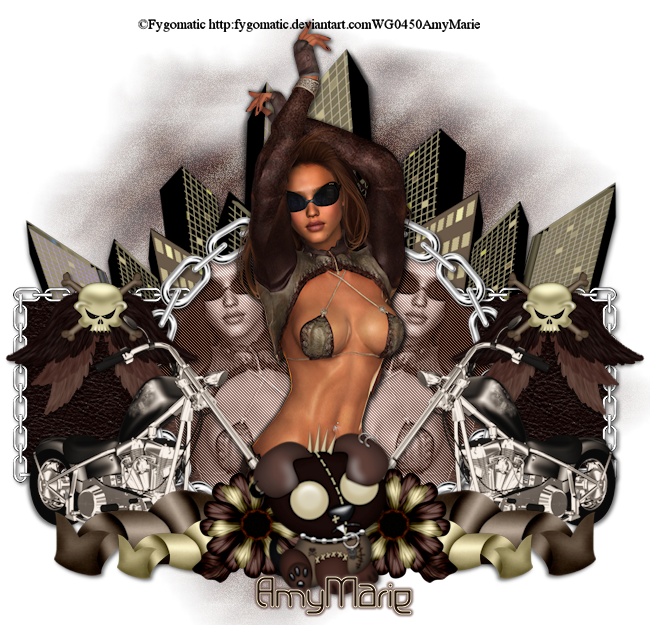
Hey guys. Tonight I am using PTU CityAtNight.
You can pick kit up here.
Tube by Fygomatic at ByWendyGstore here.
You can make one stop and get both kit at tube there!
Mask of choice.
Open a blank canvas of 650x650
open frames 3 & 1
Take frame 3-size down 40% then again at 70%
Duplicate
size down frame 1
place your frames similar to mine.
take your magic wand and inside of frames 3(merged)
selections-expand by 5-invert-add in pp 2=delete key
do pp 6 for the circle frame.
add ds to both frames.
open cityscape2 element
add ds
apply mask to pp 1
standing on pp 6 layer
selections-select all-float-defloat-invert-in close up of tube
mirror-merge-delete key
add penta jeans to tubes.
double click tube layer-blend mode-luminance legacy
add in your tube-add ds
rest of elements used were:
angelskullwings-duplicate-mirror-merge-add ds
bike-duplicate-mirror-merge-add ds
curledrib2-mirror-merge-add ds
curled rib 3-mirror-merge-add ds
flower2-mirror-merge-add ds
emopup-add ds
add your name and proper credits!
HappyPsp_inG!
Subscribe to:
Posts
(Atom)
Take One
